


Learning how to optimize content for SEO is the single most important skill for improving your website’s search rankings and driving qualified traffic. Whether you manage a WordPress site in Ottawa, run a Shopify store in Toronto, or serve customers across Canada, proper content optimization transforms ordinary web pages into powerful assets that attract visitors, engage audiences, and convert leads.
This complete guide reveals 15 essential strategies that helped AMEQ Academy achieve remarkable results: 340% organic traffic growth, 520% increase in qualified leads, and 47 competitive keyword rankings on page one.
When iWEBAPP helped AMEQ Academy transform their online presence, they weren’t just another aesthetics school in Canada. Through strategic content optimization, they became the country’s leading academy with remarkable results:
- 340% increase in organic search traffic
- 520% growth in qualified lead generation
- Page 1 rankings for 47 competitive keywords
- 280% improvement in conversion rate
- 89% reduction in bounce rate
Today, AMEQ Academy dominates search results that competitors spend thousands trying to access through paid ads. You can achieve similar results.
Content optimization for SEO is the systematic process of ensuring your website content ranks higher in search results, attracts the right visitors, and converts them into customers. It combines strategic keyword research, quality writing, proper formatting, technical improvements, and user experience enhancements that help search engines understand and value your content.
This complete guide walks you through 15 essential steps that transform ordinary content into powerful assets that drive business growth. Whether you manage a WordPress website in Ottawa, run a Shopify store in Toronto, or operate anywhere across Canada, these beginner-friendly strategies will help you compete effectively in your market.
Why Optimize Content for SEO?
Content optimization isn’t optional in today’s competitive Canadian market. Businesses that optimize content for SEO consistently outperform competitors who rely solely on paid advertising or word-of-mouth. The data is compelling: properly optimized content generates 702% ROI for B2B sectors and drives 400-600% traffic growth for e-commerce businesses.
Turn your website into a search-driven growth engine
Boost Your Rankings with AI-Powered Semantic SEO
Take the next step toward higher visibility and stronger conversions.
Understanding Content Optimization for SEO in Canada
Content optimization for SEO means creating and structuring your website content so search engines can easily understand its topic, relevance, and value. When you optimize content properly, Google and other search engines reward you with higher rankings, which brings more qualified visitors who are actively searching for what you offer.
Think of search engines as librarians organizing millions of books. When someone asks for help finding information, the librarian needs to quickly identify which books contain the best answers. Your optimized content acts like a well-organized book with clear chapter titles, an accurate summary, and helpful references that make the librarian’s job easy. The better organized your content, the more likely it gets recommended.
Why Content Optimization Matters for Canadian Businesses
For Canadian businesses specifically, content optimization carries additional considerations that affect your success:
- Language variations – Your audience may search in English or French, expecting Canadian spelling (colour, optimise, favourite) rather than American variations
- Geographic targeting – Someone searching “best accounting services” in Vancouver has different needs than someone in Halifax, even using similar search terms
- Local search behavior – Canadians often include location modifiers (“services in Toronto,” “Ottawa companies”) when searching for local businesses
- Regulatory compliance – Canadian businesses must align content with CASL (anti-spam legislation), privacy regulations, and provincial requirements
- Bilingual considerations – Quebec markets and some Ontario regions require French-language content optimization strategies
The Modern SEO Landscape
Modern SEO has evolved far beyond simple keyword placement. Today’s search engines use artificial intelligence to understand context, user intent, and content quality. They evaluate several critical factors:
- How well your content answers questions – Does it directly address what searchers want to know?
- Comprehensiveness of information – Does it provide thorough coverage or just surface-level details?
- User satisfaction signals – Do visitors find it helpful, stay engaged, and explore additional pages?
- Mobile experience – Does it work flawlessly on smartphones where most Canadians now search?
- Voice search optimization – Can it answer spoken questions people ask through smartphones and smart speakers?
- AI-generated overviews – Is it structured to appear in Google’s AI-powered answer summaries?
The good news for Canadian business owners is that content optimization doesn’t require technical expertise or expensive tools. The strategies in this guide focus on practical, beginner-friendly techniques that deliver measurable results. Many of our clients at iWEBAPP start seeing improved rankings within weeks of implementing proper content optimization, with traffic growth accelerating over the following months as search engines recognize their content quality.
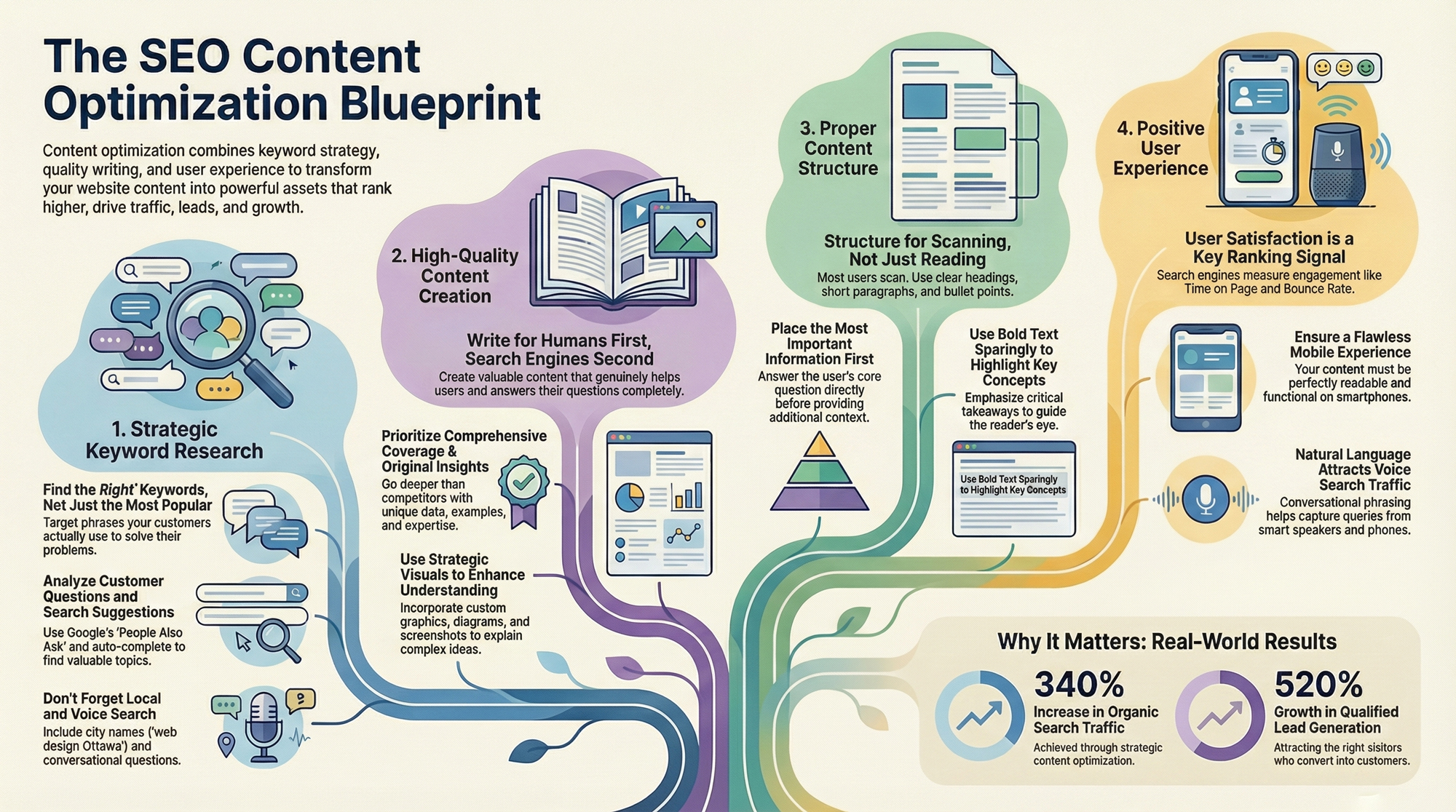
Step 1: Master Strategic Keyword Research
Keyword research forms the foundation of effective content optimization. It identifies the exact words and phrases your potential customers use when searching for businesses like yours. Without proper keyword research, you’re essentially guessing what topics matter to your audience and missing opportunities to connect with people actively looking for your solutions.
The goal isn’t finding the most popular keywords, it’s finding the right keywords that match your expertise and attract qualified leads. A small accounting firm in Ottawa shouldn’t target “accounting services” (competing against massive national firms), but could dominate “small business bookkeeping Ottawa” or “tax preparation for Canadian startups.”
Essential Keyword Research Tools for Beginners
You don’t need expensive tools to start effective keyword research. Several free and affordable options provide valuable insights into what Canadians are searching for:
FREE ESSENTIAL TOOLS
Google Keyword Planner
Cost: Free with Google Ads account (no ad spending required)
Best for: Understanding search volumes in Canada specifically, discovering related keywords you might not have considered, identifying seasonal search trends
Limitation: Provides search volume ranges rather than exact numbers for non-advertisers, but these estimates help you understand relative popularity and identify opportunities
Google Search Console
Cost: Completely free
Best for: Discovering which keywords already bring visitors to your site, identifying which pages rank for which terms, finding quick-win optimization opportunities
Value: Shows exactly where you appear in search results and reveals keywords ranking on page two or three that could reach page one with optimization
AnswerThePublic
Cost: Free for limited daily searches
Best for: Discovering common questions people ask around any topic, visualizing customer search intent, creating content that directly addresses user questions
Example: Type “website design” and see hundreds of real questions like “how much does website design cost in Canada” or “what makes a good business website”
AFFORDABLE PROFESSIONAL TOOLS
Ubersuggest
Cost: Free limited version, $12-40/month paid plans
Best for: Keyword difficulty analysis, competitor keyword research, content ideas
SEMrush & Ahrefs
Cost: $99-229/month (professional-grade)
Best for: Comprehensive competitor analysis, backlink research, content gap identification
Note: At iWEBAPP, we use these tools alongside RankMath and Yoast SEO to help our WordPress clients optimize content based on thorough keyword research that identifies both competitive opportunities and achievable rankings.
How to Find Keywords Your Canadian Customers Actually Use
The best keyword research starts with understanding your customers’ language, not industry jargon. Your prospects don’t search for “integrated digital marketing solutions,” they search for “help getting customers from Google” or “why isn’t my website getting traffic.”
Step-by-Step Keyword Discovery Process:
- List customer questions from sales conversationsWhat problems bring customers to you? What specific terms do they use to describe their challenges? These real-world phrases often become your most valuable keywords because they reflect actual search behavior.Example: If customers frequently ask “How do I get my business to show up on Google?”, that’s likely a keyword phrase worth targeting.
- Map the customer journey stagesSomeone just recognizing a problem searches differently than someone ready to hire help:
- Awareness stage: “why do I need a business website”
- Consideration stage: “WordPress vs Shopify for small business”
- Decision stage: “web design company Ottawa” or “eCommerce developer near me”
Create content targeting different journey stages to capture prospects at every point.
- Mine Google’s search suggestionsType your main keyword into Google and notice what auto-completes. Scroll to the bottom of results for “related searches.” These suggestions come directly from what real people search for, making them incredibly valuable for Canadian content optimization.
- Analyze “People Also Ask” sectionsGoogle’s “People Also Ask” boxes reveal common questions around your topic. Each question represents actual user queries and provides content ideas that directly address search intent.
- Include local variations and Canadian-specific phrasingCanadians often include location in searches and may use British spelling variations:
- “SEO services in Toronto” vs generic “SEO services”
- “Ottawa web design companies” for local intent
- “colour consultation” with ‘u’ signals Canadian searchers
- Province-specific searches like “Ontario business regulations”
- Study competitor contentExamine which keywords competitors rank for using tools like SEMrush or Ahrefs. Look for gaps where they rank but you don’t, or areas where their content is thin and you could provide better coverage.
- Consider voice search patternsVoice searches tend to be longer and more conversational:
- Typed search: “best pizza Ottawa”
- Voice search: “What’s the best pizza place near me in Ottawa that’s open now?”
Include natural question phrases in your keyword research to capture voice search traffic.
💡 iWEBAPP Pro Tip
Create a simple spreadsheet tracking your target keywords with columns for: keyword phrase, monthly search volume, difficulty level, current ranking position, and target page URL. This helps you prioritize optimization efforts and track progress over time.

Step 2: Create High-Quality, User-Focused Content
Search engines have become sophisticated enough to distinguish between content written primarily for ranking manipulation and content genuinely created to help users. High-quality, user-focused content consistently outperforms keyword-stuffed, thin content regardless of optimization tactics.
The fundamental principle is simple yet often overlooked: create content so valuable that people want to share it, reference it, and return to it. When your content genuinely helps someone solve a problem or answer a question, everything else in SEO becomes easier because you’ve built something worth ranking.
What Makes Content “High Quality” for Search Engines
Search engines evaluate content quality through multiple signals, many tied directly to user behavior. Understanding these quality factors helps you create content that both users and algorithms value:
Core Quality Signals:
1. Comprehensive Topic Coverage
Depth matters more than length. A 1,500-word article that thoroughly addresses a specific question outperforms a 3,000-word article that touches on many topics superficially.
- Good: “The Complete Guide to Optimizing WordPress Images for Speed” (deep, focused)
- Poor: “Everything About WordPress” (broad, shallow)
2. Original Insights and Unique Perspectives
Separate your content from thousands of articles repeating the same basic information:
- Share specific examples from your Canadian business experience
- Include real data from your projects (with client permission)
- Offer frameworks you’ve developed through practice
- Provide industry-specific applications of general concepts
The expertise you bring from actually doing the work in your field creates content competitors can’t replicate by simply rewriting existing articles.
3. Accuracy and Trustworthiness
Content containing factual errors, outdated information, or misleading claims damages credibility regardless of other optimization. For Canadian businesses, this includes:
- Ensuring compliance references remain current with Canadian regulations
- Using recent statistics and data (cite sources with dates)
- Aligning advice with Canadian laws rather than American or international practices
- Correcting outdated information when industry standards evolve
4. Strategic Visual Elements
Visual elements enhance quality when used purposefully, not just as decoration:
- Custom graphics that illustrate concepts unique to your business
- Data visualizations showing statistics or comparisons
- Process diagrams explaining multi-step procedures
- Screenshots demonstrating software or platforms
- Before/after examples showing transformation or improvement
At iWEBAPP, our graphic design team creates custom visuals that help explain complex web development or marketing concepts to clients, which then become valuable content assets that distinguish our educational articles from text-only competitors.
5. User Engagement Signals
Search engines monitor how users interact with your content:
- Time on page – Do visitors stay and read or leave immediately?
- Bounce rate – Do they explore other pages or bounce back to search results?
- Return visits – Do people bookmark and return to your content?
- Social sharing – Do readers share your content on social platforms?
- Comments and discussion – Does content spark conversation?
Writing for Humans First, Search Engines Second
The most common content optimization mistake is writing primarily for search engines while forgetting actual human readers. This produces awkward, repetitive content that technically includes keywords but fails to engage, persuade, or help anyone.
Principles for Human-Centered SEO Content:
Use Conversational, Accessible Language
Write as if explaining concepts to a smart friend who’s unfamiliar with your industry. Use clear language that welcomes readers rather than corporate jargon that distances them.
Instead of: “Utilize our comprehensive suite of integrated digital solutions to optimize your online presence.”
Write: “We help Canadian businesses attract more customers through better websites and smart marketing.”
Let Keywords Flow Naturally
Natural keyword integration happens automatically when you write about topics thoroughly. If you’re explaining website design for Toronto businesses, terms like “responsive design,” “mobile optimization,” and “user experience” appear naturally because they’re essential to the topic.
You don’t need to force keywords into every paragraph when the subject matter inherently includes them.
Structure for Scanning and Readability
Most website visitors scan content looking for relevant sections rather than reading every word sequentially:
- Clear headings that summarize section content
- Short paragraphs (3-4 sentences maximum)
- Bullet points for lists and key takeaways
- Bold text to highlight important concepts (sparingly)
- White space that prevents overwhelming text blocks
This structure helps both scanning visitors and search engines understand your content organization.
Answer Questions Directly and Completely
If someone searches “how much does Shopify web design cost in Canada,” they want specific information about pricing, not a sales pitch about why they need a website. Content that directly answers the search query satisfies users and earns higher rankings because search engines recognize when content delivers what searchers actually wanted.
Good approach: Start with the direct answer, then provide context and additional value.
Maintain Your Brand Voice
SEO content doesn’t mean robotic, generic content. Your unique brand personality should shine through:
- If you’re technical and precise, reflect that in your writing
- If you’re friendly and approachable, let that warmth show
- If you’re bold and innovative, demonstrate that confidence
Authentic voice builds connection and trust that generic “SEO content” never achieves.
✓ High-Quality Content Checklist
Before publishing, verify your content meets these standards:
☐ Thoroughly addresses the main topic with comprehensive coverage
☐ Includes original insights, examples, or data you haven’t seen elsewhere
☐ Uses current, accurate information with sources cited where appropriate
☐ Incorporates relevant visuals that enhance understanding
☐ Written in clear, conversational language accessible to your target audience
☐ Structured with clear headings, short paragraphs, and scannable formatting
☐ Directly answers the question or solves the problem that led someone to search
☐ Includes actionable takeaways or next steps
☐ Free of grammatical errors and typos
☐ Reflects your authentic brand voice and expertise
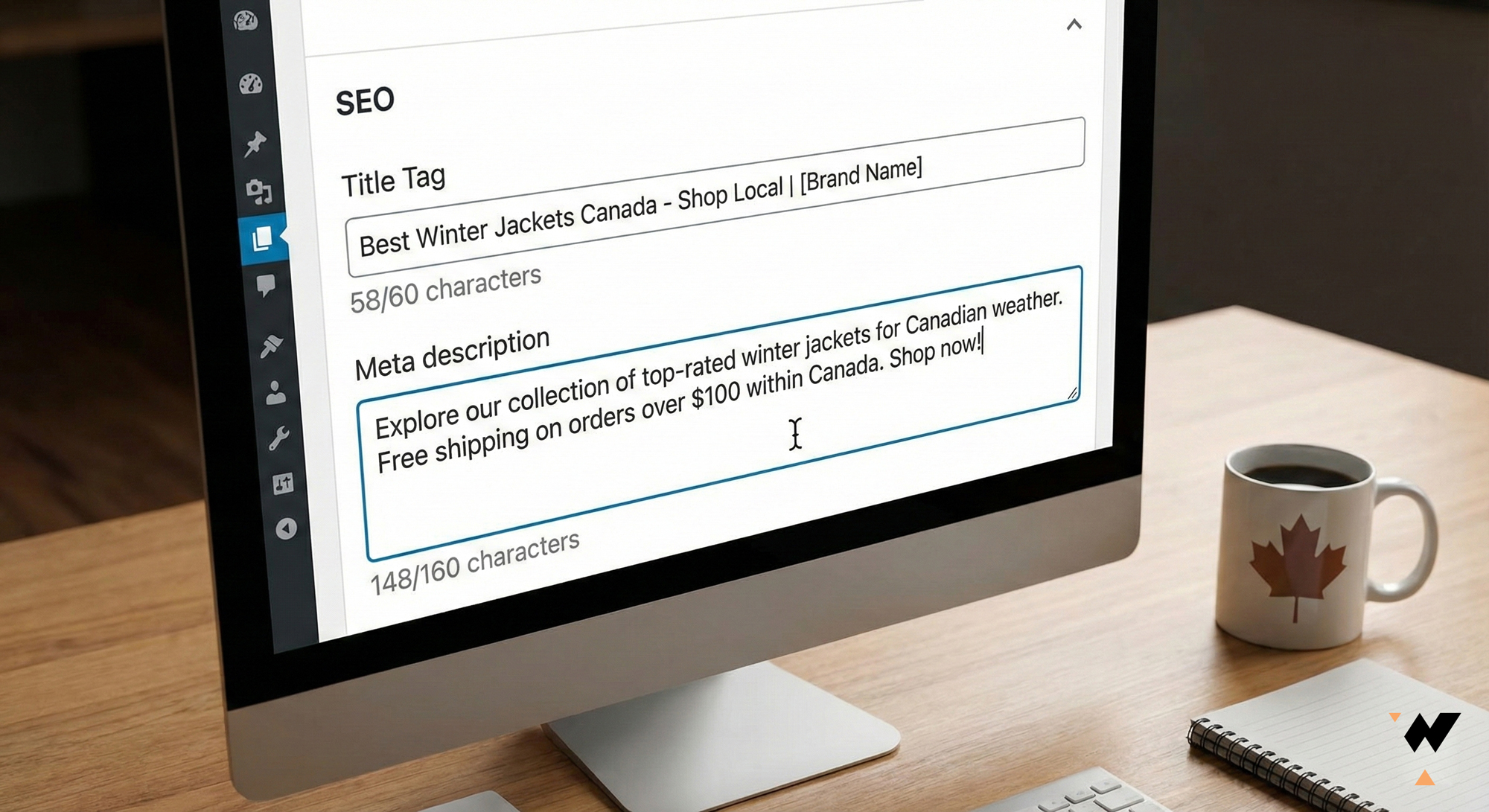
Step 3: Optimize Your Title Tags and Meta Descriptions
Title tags and meta descriptions serve as your content’s first impression in search results. They’re the clickable headline and preview text that searchers see before deciding whether to visit your page. Even if you rank on page one, poorly written titles and descriptions mean fewer clicks and less traffic.
Think of these elements as your content’s advertising space in search results. You’re competing against 9 other results on page one, all trying to earn the same click. Your title and description must stand out, communicate value clearly, and compel searchers to choose your result over competitors.
Crafting Click-Worthy Title Tags
Title tags directly impact both rankings and click-through rates, making them one of the most important on-page SEO elements:
Title Tag Best Practices:
1. Keep Under 60 Characters
Google typically displays the first 50-60 characters of title tags. Longer titles get truncated with “…” which wastes valuable space and may cut off important information.
Good: “WordPress Web Design Ottawa | Custom Sites | iWEBAPP” (53 chars)
Too Long: “Professional Custom WordPress Web Design and Development Services in Ottawa and Surrounding Areas” (96 chars – gets cut off)
2. Place Primary Keyword First
Search engines give more weight to words appearing earlier in titles. Lead with your main keyword, then add modifiers or branding:
- Optimal: “SEO Services Toronto | Proven Rankings | iWEBAPP”
- Weaker: “iWEBAPP Offers SEO Services in Toronto”
3. Include Power Words and Numbers
Certain words and numbers increase click-through rates by creating urgency, curiosity, or value perception:
- Power words: Ultimate, Complete, Essential, Proven, Expert, Free, Fast
- Numbers: “15 Steps,” “2024 Guide,” “Top 10,” “3 Proven Methods”
- Example: “15 Proven SEO Strategies for Canadian Businesses”
4. Add Location for Local Businesses
Canadian businesses targeting specific cities should include location in titles:
- “Web Design Ottawa” not just “Web Design”
- “Toronto SEO Services” not just “SEO Services”
- “Custom Websites Canada” for national reach
This improves rankings for local searches and attracts geographically relevant traffic.
5. Make Each Title Unique
Every page on your website needs a distinct title tag. Duplicate titles confuse search engines about which page to rank and dilute your optimization efforts.
Meta Descriptions That Drive Canadian Traffic
While meta descriptions don’t directly impact rankings, they significantly influence whether searchers click your result. A compelling description can increase click-through rates by 20-30%, bringing more traffic even at the same ranking position.
Meta Description Best Practices:
1. Stay Within 150-160 Characters
Google displays approximately 150-160 characters in search results. Longer descriptions get truncated, potentially cutting off your call-to-action or key selling point.
Good length: “Get expert SEO services in Toronto that increase rankings and drive qualified traffic. 340% average traffic growth. Free consultation available. Call today!” (152 chars)
2. Include Your Primary Keyword Naturally
Google bolds keywords in descriptions that match the search query, making your result stand out visually:
Search query: “WordPress web design Toronto”
Description: “Professional WordPress web design in Toronto. Custom, fast-loading sites that convert visitors into customers. 20+ years experience.”
The bolded text catches attention and confirms relevance.
3. Communicate Clear Value Proposition
Answer the searcher’s question: “Why should I click this result instead of the others?”
- Weak: “We provide web design services in Ottawa and surrounding areas.”
- Strong: “Ottawa web design that drives 340% more leads. Award-winning team, proven results, free consultation.”
4. Include a Compelling Call-to-Action
Tell searchers what to do next. CTAs increase click-through rates by providing clear next steps:
- “Get your free SEO audit today”
- “Book a consultation now”
- “Download the complete guide”
- “See our portfolio”
- “Call for pricing”
5. Add Trust Signals or Unique Benefits
Mention credentials, guarantees, or differentiators that build confidence:
- “20+ years experience”
- “Award-winning agency”
- “500+ Canadian businesses served”
- “Free consultation included”
- “Satisfaction guaranteed”
Before and After Examples:
Example 1: Service Page
Before (Weak):
Web Design Services
We offer professional web design services for businesses. Contact us today to learn more about our services.
After (Optimized):
Professional Web Design Ottawa | Custom Sites | iWEBAPP
Award-winning web design in Ottawa that converts visitors into customers. 340% avg traffic growth. Free consultation. Call: 613-879-5266
Example 2: Blog Post
Before (Weak):
How to Improve Your Website
This article explains different ways you can improve your website to get better results from it.
After (Optimized):
15 Proven Ways to Improve Website Performance (Canada Guide)
Boost your Canadian website’s speed, conversions & rankings with these expert strategies. Includes free checklist. Read the complete guide now!
Turn your website into a search-driven growth engine
Ready to Transform Your Content Strategy?
iWEBAPP’s SEO services include comprehensive content optimization strategies tailored to Canadian businesses. From keyword research to content creation and ongoing optimization, we help you build content that ranks and converts.
Step 4: Structure Content with Proper Headings (H1, H2, H3)
Heading tags (H1, H2, H3, H4, etc.) organize your content into a clear hierarchy that benefits both human readers and search engines. Think of headings as the outline of your document, creating a logical structure that guides readers through your information and helps search engines understand which topics and subtopics you’re covering.
Why Heading Hierarchy Matters for SEO
Proper heading structure serves multiple critical functions for content optimization:
- Search engine comprehension – Headings signal topic hierarchy and help algorithms understand content organization, influencing how pages get categorized and ranked
- Improved accessibility – Screen readers use headings to navigate content, allowing visually impaired users to jump between sections efficiently
- Better user experience – Clear headings let scanners quickly find relevant sections without reading every word
- Featured snippet opportunities – Google often pulls heading text for featured snippets and “People Also Ask” boxes
- Keyword optimization – Headings provide natural opportunities to include secondary keywords and topic variations
How to Use Headings for Better Readability
Heading Structure Rules:
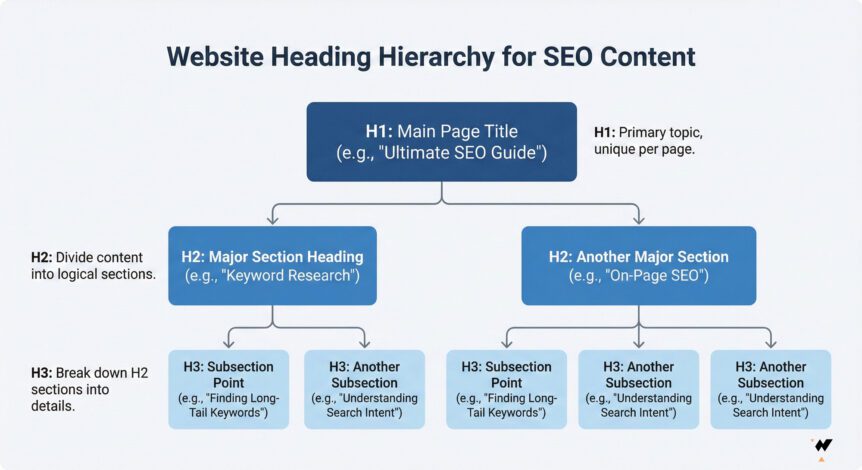
Rule 1: One H1 Per Page (Your Main Title)
Every page should have exactly one H1 tag containing your primary keyword and main topic. This is typically your page title or article headline.
Good H1 examples:
- “15 Essential Steps to Optimize Your Content for Better SEO”
- “Professional Web Design Services in Ottawa”
- “Complete Guide to WordPress Security for Canadian Businesses”
Common mistake: Using multiple H1 tags or skipping H1 entirely confuses search engines about your page’s main topic.
Rule 2: Use H2s for Main Sections
H2 headings divide your content into major sections, each covering a distinct subtopic related to your H1. These should include secondary keywords and variations of your main topic.
Example structure for this article:
- H1: “15 Essential Steps to Optimize Your Content for Better SEO”
- H2: “Step 1: Master Strategic Keyword Research”
- H2: “Step 2: Create High-Quality, User-Focused Content”
- H2: “Step 3: Optimize Your Title Tags and Meta Descriptions”
Rule 3: Use H3s for Subsections Within H2s
H3 headings break down H2 sections into more specific topics. They create a nested hierarchy that improves scannability:
Example nested structure:
- H2: “Step 1: Master Strategic Keyword Research”
- H3: “Essential Keyword Research Tools for Beginners”
- H3: “How to Find Keywords Your Canadian Customers Actually Use”
Rule 4: Don’t Skip Heading Levels
Always follow proper hierarchy: H1 → H2 → H3 → H4. Never jump from H1 to H3 skipping H2, or H2 to H4 skipping H3.
Wrong: H1 → H3 (skips H2)
Right: H1 → H2 → H3 → H4
This maintains proper document outline structure for accessibility and SEO.
Rule 5: Make Headings Descriptive and Keyword-Rich
Headings should clearly describe the section content while naturally incorporating relevant keywords:
Weak heading: “Getting Started”
Strong heading: “How to Get Started with Keyword Research for Canadian Businesses”
The stronger version is more descriptive, includes keywords (“keyword research,” “Canadian businesses”), and sets clear expectations.
Rule 6: Keep Headings Concise
While headings should be descriptive, avoid making them too long. Aim for 70 characters or less so they remain scannable:
- Too long: “A Complete and Comprehensive Guide to Understanding Everything You Need to Know About Search Engine Optimization Content Optimization” (128 chars)
- Better: “Complete Guide to SEO Content Optimization” (44 chars)
Real-World Heading Structure Example:
<h1>Professional SEO Services in Ottawa</h1>

  <h2>What Makes Our Ottawa SEO Services Different</h2>
    <h3>Data-Driven Strategy Development</h3>
    <h3>Transparent Reporting and Communication</h3>
    <h3>Local Ottawa Market Expertise</h3>

  <h2>Our Comprehensive SEO Service Offerings</h2>
    <h3>Technical SEO Optimization</h3>
    <h3>Content Strategy and Creation</h3>
    <h3>Link Building and Authority Development</h3>

  <h2>Industries We Serve in Ottawa</h2>
    <h3>Healthcare and Medical Practices</h3>
    <h3>Professional Services</h3>
    <h3>E-Commerce and Retail</h3>
This structure clearly organizes content, incorporates keywords naturally, and makes scanning easy.
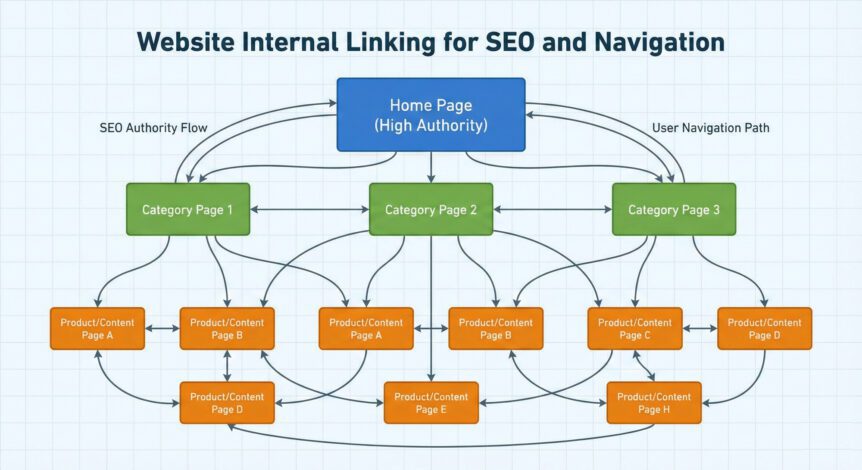
Step 5: Implement Strategic Internal Linking
Internal linking connects pages within your website, creating pathways for users to discover related content and for search engines to understand your site structure. Well-planned internal links distribute authority across your website, improve user engagement, and help important pages rank higher.
Many Canadian business websites overlook internal linking, leaving valuable content isolated and difficult to discover. Strategic internal linking transforms your website from a collection of disconnected pages into an interconnected resource that guides visitors and search engines effectively.
Building Your Website’s Link Architecture
Effective internal linking follows a logical architecture that prioritizes important pages and creates clear pathways to conversion:
Internal Linking Best Practices:
1. Link from High-Authority Pages to Important Pages
Your homepage and popular blog posts typically have the most authority. Link from these pages to:
- Service pages you want to rank higher
- Product pages with high profit margins
- Conversion pages like consultation booking or contact forms
- Pillar content that demonstrates your expertise
For example, iWEBAPP’s homepage links to key service pages and the portfolio, passing authority to pages we want to rank well.
2. Create Topic Clusters with Pillar Pages
Organize content into topic clusters where:
- One comprehensive pillar page covers a broad topic (e.g., “Complete SEO Guide”)
- Multiple cluster pages dive deep into specific subtopics (e.g., “Keyword Research,” “Link Building,” “Technical SEO”)
- All cluster pages link back to the pillar page
- The pillar page links to all cluster pages
This structure signals topical authority to search engines and creates a logical content organization.
3. Use Contextual Links Within Content
The most valuable internal links appear naturally within your content, not just in navigation menus:
Example: “Our Shopify development services help Toronto retailers create high-converting online stores that integrate seamlessly with inventory management systems.”
Contextual links pass more authority than footer or sidebar links because they’re embedded in relevant content.
4. Link to Related Content
At the end of blog posts or within service pages, suggest related content that adds value:
Related articles:
- “After optimizing your content, learn about technical SEO fundamentals“
- “Discover how professional web design amplifies your SEO efforts”
This keeps visitors engaged, reduces bounce rate, and increases pages per session, all positive SEO signals.
5. Fix Broken Internal Links
Regularly audit your website for broken internal links that create poor user experience and waste authority:
- Use tools like Screaming Frog or Google Search Console to identify 404 errors
- Update or remove links pointing to deleted pages
- Redirect old URLs to relevant current pages
Anchor Text Best Practices for Beginners
Anchor text is the clickable text in a link. Strategic anchor text helps search engines understand what the linked page is about:
Anchor Text Types and Usage:
Exact Match (Use Sparingly – 20-30%)
Links using your exact target keyword. Too many exact match anchors look unnatural:
Example: “Our SEO services help Canadian businesses rank higher”
Partial Match (Most Common – 40-50%)
Links containing your keyword plus additional words. This appears more natural:
Example: “Learn more about professional SEO strategies that work”
Branded (Natural Mix – 15-20%)
Links using your brand name or website name:
Example: “iWEBAPP has helped 500+ Canadian businesses improve their online presence”
Generic (Use Occasionally – 10-15%)
Common phrases like “click here” or “learn more.” Use minimally as they provide little SEO value:
Example: “Want better rankings? Contact us today“
Quick Internal Linking Tips:
✓ Aim for 3-5 internal links per 1,000 words of content
✓ Link deep into your site, not just to the homepage
✓ Make sure important pages receive links from multiple sources
✓ Open internal links in the same tab (external links in new tabs)
✓ Use descriptive anchor text that tells users what to expect
✓ Avoid excessive linking (10+ links per paragraph looks spammy)
✓ Ensure every page can be reached within 3 clicks from homepage
Step 6: Optimize Images and Visual Content
Images make content more engaging and easier to understand, but unoptimized images slow down your website and miss SEO opportunities. Proper image optimization improves page speed (a ranking factor), provides accessibility for visually impaired users, and can drive traffic through Google Image Search.
Image File Names and Alt Text Explained
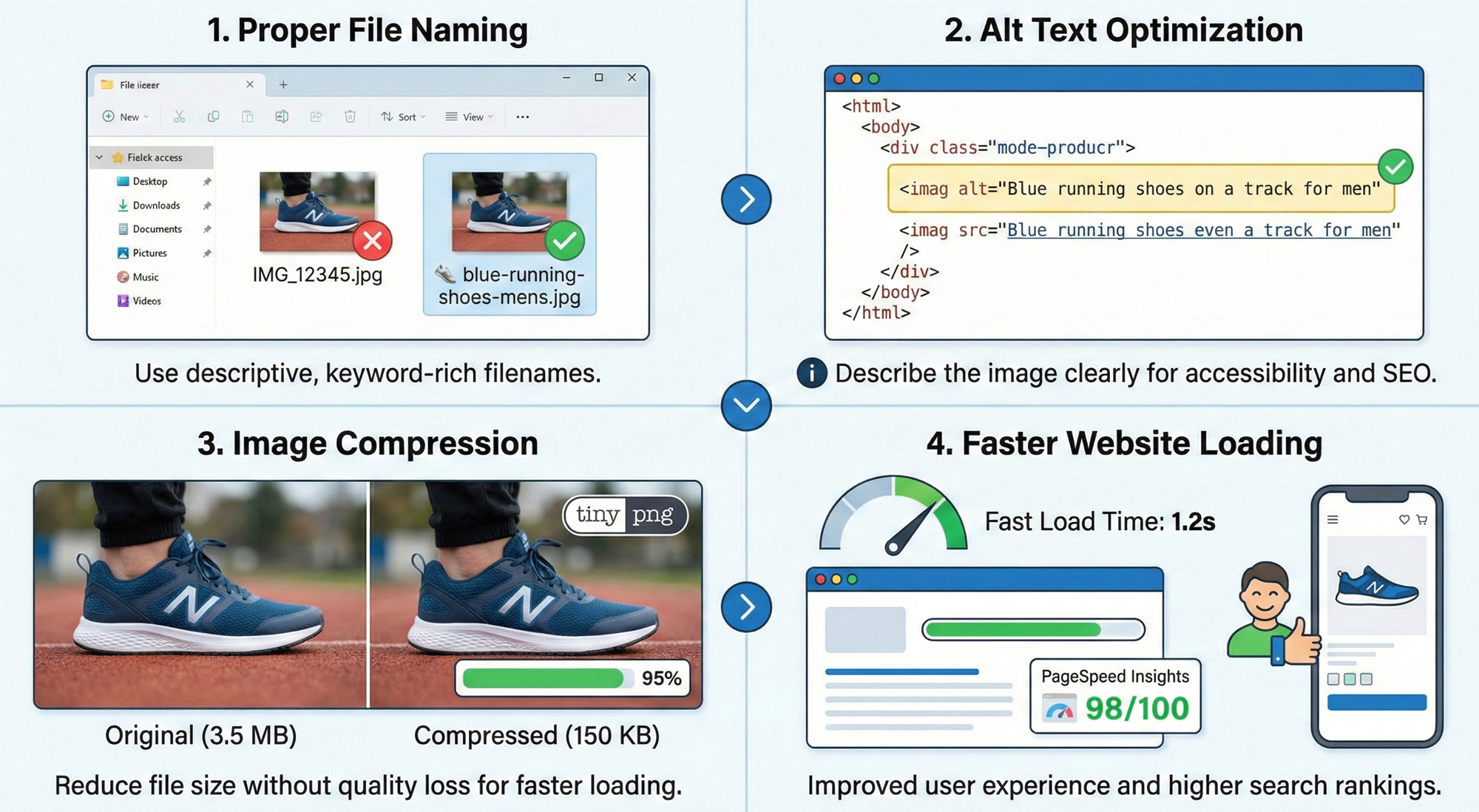
Descriptive File Names
Rename images before uploading to include relevant keywords:
- Bad: IMG_1234.jpg, screenshot-2024.png
- Good: toronto-web-design-responsive-example.jpg
- Best: iwebapp-custom-wordpress-website-ottawa-business.jpg
Use hyphens (not underscores) to separate words. Search engines read hyphens as spaces.
Alt Text for Accessibility and SEO
Alt text describes images for screen readers and appears if images fail to load. Write descriptive alt text that includes your keyword naturally:
- Bad: “image1” or “picture”
- Good: “Custom WordPress website design for Ottawa business”
- Best: “Responsive WordPress website design showing mobile and desktop views for Ottawa healthcare practice”
Keep alt text under 125 characters and describe what the image shows, not just keywords.
Image Compression for Faster Loading
Large image files slow down your website dramatically. Compress images before uploading:
- Tools: TinyPNG, ShortPixel, ImageOptim (Mac), Squoosh.app
- Target: Under 100KB for most images, under 200KB for hero images
- Format: Use WebP for modern browsers (smaller files), with JPG fallback
- WordPress: Plugins like Smush or ShortPixel automate compression
A page loading in 2 seconds has much better rankings than one taking 5+ seconds.
Proper Image Dimensions
Don’t upload 4000x3000px images when displaying at 800x600px. Resize images to actual display size:
- Blog featured images: 1200x630px (optimal for social sharing)
- In-content images: 800-1200px wide maximum
- Thumbnails: 300-400px wide
Lazy Loading for Performance
Lazy loading delays loading images until users scroll near them, speeding up initial page load. Most modern WordPress themes and custom websites built by iWEBAPP include lazy loading automatically.
Step 7: Improve Content Readability and User Experience
Even the most valuable content fails if it’s difficult to read. Readability directly impacts user engagement metrics like time on page and bounce rate, both of which influence SEO rankings. Format your content so readers can easily scan, understand, and engage with it.
Formatting Tips for Easy Scanning
Essential Readability Practices:
- Use short paragraphs: 2-4 sentences maximum. Long paragraph blocks intimidate readers and increase bounce rates.
- Add white space: Space between paragraphs, headings, and sections makes content less overwhelming and easier to navigate.
- Include bullet points and lists: Break down complex information into scannable lists (like this one). Lists are easier to remember than paragraphs.
- Bold key concepts: Highlight important terms and takeaways with bold text, but don’t overuse it (maximum 1-2 per paragraph).
- Use transitional phrases: Connect ideas with phrases like “Additionally,” “However,” “For example,” “As a result” to guide readers through your content.
- Vary sentence length: Mix short, punchy sentences with longer, detailed ones to create rhythm and maintain interest.
- Add visual breaks: Use images, pull quotes, or callout boxes every 300-400 words to break up text and maintain visual interest.
Readability Tools:
- Hemingway Editor: Highlights complex sentences and suggests simplifications
- Grammarly: Checks grammar, clarity, and engagement
- Yoast SEO/RankMath: Provides readability scores in WordPress
- Readable.com: Analyzes reading level and complexity
Paragraph Length and Sentence Structure
Optimal paragraph length: 40-70 words (2-4 sentences). Canadian readers scanning on mobile devices appreciate concise paragraphs that deliver one clear idea each.
Target reading level: Aim for Grade 8-10 reading level for general audiences. Industry-specific technical content can be more advanced, but clarity always trumps complexity.
Sentence length variety:
- Short sentences (5-10 words): Create impact and emphasis
- Medium sentences (15-20 words): Deliver most information clearly
- Long sentences (25+ words): Provide detail and nuance, but use sparingly
Active voice vs. passive voice: Use active voice for clarity and directness. “iWEBAPP optimizes websites” (active) reads better than “Websites are optimized by iWEBAPP” (passive).
Before and After Example:
Before (Poor Readability):
“In order to achieve optimal search engine optimization results for your Canadian business website it is necessary to implement a comprehensive content optimization strategy that encompasses keyword research content creation technical optimization and ongoing performance monitoring which when executed properly by experienced professionals such as those at our agency can lead to significant improvements in organic search visibility leading to increased qualified traffic and ultimately higher conversion rates and revenue growth for businesses operating in competitive markets such as Toronto and Ottawa where many companies are competing for the same audience.”
Issues: 89-word run-on sentence, passive voice, jargon-heavy, no breaks
After (Good Readability):
Want better search rankings for your Canadian business? Start with comprehensive content optimization.
This strategy includes:
- Strategic keyword research targeting Canadian customers
- High-quality content creation that answers user questions
- Technical optimization for speed and accessibility
- Ongoing performance monitoring and improvements
When executed properly, businesses in competitive markets like Toronto and Ottawa see significant improvements: higher rankings, increased qualified traffic, and better conversion rates.
Improvements: Short paragraphs, scannable list, clear structure, active voice
Turn your website into a search-driven growth engine
Ready to Transform Your Content Strategy?
iWEBAPP’s SEO services include comprehensive content optimization strategies tailored to Canadian businesses. From keyword research to content creation and ongoing optimization, we help you build content that ranks and converts.
Step 8: Add Schema Markup for Rich Search Results
Schema markup is code that helps search engines understand your content better, enabling rich results like star ratings, FAQs, and event details directly in search listings. While technical, basic schema implementation is straightforward and significantly improves click-through rates.
What is Schema Markup? (Beginner Explanation)
Schema markup provides search engines with explicit information about your content’s meaning. For example, a recipe page might include schema indicating ingredients, cooking time, and nutritional information, allowing Google to display this as a rich result with images and ratings.
Essential Schema Types for Canadian Businesses
- Organization Schema: Business name, logo, contact information, social profiles
- LocalBusiness Schema: Address, phone, hours, service areas (critical for local SEO)
- Article Schema: Blog posts with author, publish date, headline
- FAQPage Schema: Questions and answers (increases chances of appearing in featured snippets)
- Product Schema: E-commerce items with price, availability, reviews
- Service Schema: Services offered with descriptions and areas served
WordPress plugins like RankMath and Yoast SEO simplify schema implementation without requiring coding knowledge.
Step 9: Optimize for Voice Search and AI-Generated Answers
Voice search and AI-powered answer engines (like Google’s AI Overviews) are changing how people find information. Optimizing for these technologies means structuring content to provide direct, conversational answers to common questions.
How Canadians Use Voice Search
Voice searches are typically longer and more conversational than typed queries. Instead of typing “Ottawa restaurants,” voice searchers ask “What are the best restaurants in Ottawa open now?” Target these natural language patterns.
Structuring Content for Featured Snippets
- Answer questions directly: Provide 40-60 word answers at the beginning of sections
- Use question-based headings: “How Much Does Web Design Cost?” rather than “Pricing”
- Create FAQ sections: Natural fit for voice search queries
- Include “near me” variations: Optimize for local voice searches like “web design near me”
- Use conversational language: Write how people actually speak, not keyword-stuffed text
Step 10: Create Mobile-First Content Experiences
Over 60% of searches in Canada happen on mobile devices. Google uses mobile-first indexing, meaning your mobile site version determines rankings. Content must work flawlessly on smartphones and tablets.
Mobile Content Best Practices
- Short paragraphs: 2-3 sentences maximum for mobile readability
- Large tap targets: Buttons and links at least 48×48 pixels
- Minimize pop-ups: Google penalizes intrusive mobile interstitials
- Fast loading: Target under 3 seconds on 4G connections
- Thumb-friendly navigation: Important elements within easy thumb reach
- Readable font sizes: Minimum 16px for body text, no pinch-to-zoom required
Test your mobile experience using Google’s Mobile-Friendly Test tool and actual devices, not just desktop browser resize.
Step 11: Build Topical Authority with Content Clusters
Content clusters organize related articles around core topics, signaling expertise to search engines. Create one comprehensive “pillar page” about a broad topic, then link to multiple detailed “cluster pages” covering specific subtopics.
How iWEBAPP Uses Pillar Content Strategy
Example cluster structure:
- Pillar Page: “Complete Web Design Guide for Canadian Businesses” (3,000+ words)
- Cluster Pages:
- “WordPress vs Shopify: Which Platform for Canadian E-Commerce?”
- “Website Accessibility Compliance in Canada (AODA)”
- “How Much Does Professional Web Design Cost in Ottawa?”
- “Mobile-First Design Best Practices”
All cluster pages link back to the pillar page, and the pillar page links to all clusters. This interconnected structure demonstrates comprehensive topic coverage and improves rankings for all related pages.
Step 12: Optimize Content Length and Depth
How Long Should Your Content Be?
Content length should match user intent and competition, not arbitrary word counts. Research shows:
- Quick answers: 300-600 words for simple how-to or definition content
- Blog posts: 1,500-2,500 words for comprehensive guides
- Pillar content: 3,000-5,000 words for ultimate topic authority
- Service pages: 800-1,500 words balancing information and conversion
Balancing Comprehensiveness with Readability
Long content works only if it remains engaging. Break lengthy articles into clear sections with headings, include visual elements every 300-400 words, and use a table of contents for navigation. Quality and relevance matter more than hitting word count targets.
Step 13: Update and Refresh Existing Content Regularly
Why Fresh Content Matters for Rankings
Search engines favor recently updated content for many queries. Regular updates signal your website remains active and information stays current, both ranking factors especially for time-sensitive topics.
How to Identify Content Worth Updating
Prioritize updating content that:
- Ranks on page 2-3: Often needs minor improvements to reach page 1
- Contains outdated statistics: Replace old data with current information
- Covers evolving topics: SEO strategies, technology guides, industry trends
- Has declining traffic: Google Search Console shows traffic drops
- Receives consistent impressions but low clicks: Improve titles and meta descriptions
Update at least quarterly for competitive topics, annually for evergreen content. Add new sections, refresh examples, improve formatting, and update the publish date to signal freshness.
Step 14: Track and Measure Content Performance
Essential SEO Metrics for Beginners
Focus on metrics that indicate content success:
- Organic traffic: Visitors from search engines (Google Analytics)
- Keyword rankings: Position for target keywords (Google Search Console, RankMath)
- Click-through rate (CTR): Percentage of impressions resulting in clicks
- Time on page: How long visitors stay engaged with content
- Bounce rate: Percentage leaving without visiting other pages
- Conversions: Actions taken (form submissions, calls, purchases)
Using Google Analytics and Search Console
Google Analytics tracks visitor behavior and traffic sources. Google Search Console shows search performance, including which keywords drive impressions and clicks, your average ranking positions, and technical issues affecting SEO. Review these tools monthly to identify optimization opportunities and track progress.
Step 15: Avoid Common Content Optimization Mistakes
Keyword Stuffing and Over-Optimization
What it is: Forcing keywords unnaturally into content multiple times to manipulate rankings.
Why it fails: Modern algorithms detect and penalize keyword stuffing. It also creates poor user experience that increases bounce rates.
Solution: Use keywords naturally where they fit. Aim for 1-2% keyword density, focusing on variations and synonyms rather than exact repetition.
Duplicate Content Issues and Solutions
Common causes: Copying competitor content, publishing identical content on multiple pages, syndication without proper canonical tags.
Impact: Search engines may not know which version to rank, potentially harming all duplicate versions.
Solutions: Always create original content, use canonical tags for necessary duplicates, implement 301 redirects for similar pages, and add unique value even when covering common topics.
Other Critical Mistakes to Avoid
- Ignoring search intent: Creating content that doesn’t match what searchers actually want
- Thin content: Publishing pages with minimal value just to target keywords
- Broken internal links: Links pointing to deleted or moved pages
- Missing or duplicate meta descriptions: Wasting opportunities to attract clicks
- Neglecting mobile optimization: Losing 60%+ of potential traffic
- Forgetting local SEO: Missing “near me” and location-based searches

Real Success Story: How AMEQ Academy Became Canada’s Leading Aesthetics Academy Through Content Optimization
The Challenge: Limited Online Visibility in a Competitive Market
AMEQ Academy, a professional aesthetics training institution, struggled with online visibility despite offering superior education. Their website attracted minimal organic traffic, ranking on pages 3-5 for competitive keywords. Prospective students found competitors first, costing AMEQ valuable enrollment opportunities.iWEBAPP’s Strategic Content Optimization Approach
We implemented a comprehensive content optimization strategy combining all 15 steps outlined in this guide:- Extensive keyword research identifying high-intent searches like “aesthetics training Canada” and “professional microblading courses”
- Complete content overhaul with in-depth program descriptions, student success stories, and industry insights
- Technical optimization improving site speed, mobile experience, and implementing comprehensive schema markup
- Content cluster development around core topics like certification pathways, career opportunities, and technique mastery
- Local SEO enhancement targeting multiple Canadian cities where AMEQ operates
Remarkable Results That Transformed Their Business
340%
Increase in Organic Traffic520%
Growth in Qualified Leads47
Page 1 Keyword Rankings280%
Conversion Rate Improvement89%
Bounce Rate Reduction12
Featured Snippets CapturedKey Takeaways You Can Apply
- Quality content beats quantity: AMEQ published fewer but more comprehensive, valuable articles
- Consistent optimization produces compound results: Monthly refinements built momentum over time
- Professional guidance accelerates success: Expert strategy prevented costly trial-and-error
- Canadian market expertise matters: Local understanding improved targeting and relevance
- Integration works best: Combining content, technical, and UX optimization delivered superior results
How iWEBAPP Services Support Content Optimization
Successful content optimization requires the right technical foundation, ongoing expertise, and integrated strategy. iWEBAPP provides comprehensive services that work together to maximize your SEO results:Custom WordPress Website Design
Build SEO-optimized websites from the ground up with clean code, fast loading speeds, proper heading structure, and mobile-responsive design that search engines love.Shopify E-Commerce Optimization
Create high-converting Shopify stores with product page optimization, technical SEO implementation, and content strategies that drive both traffic and sales.Comprehensive SEO Services
Ongoing keyword research, content optimization, technical audits, link building, and performance monitoring that continuously improve your rankings and traffic.AI-Powered Automation
Streamline content management, automate reporting, and leverage AI tools for keyword research, content ideation, and performance analysis.Integrated Digital Marketing
Combine content optimization with PPC advertising, social media marketing, and conversion rate optimization for maximum business growth.Turn your website into a search-driven growth engine
Ready to Transform Your Content Strategy?
iWEBAPP’s SEO services include comprehensive content optimization strategies tailored to Canadian businesses. From keyword research to content creation and ongoing optimization, we help you build content that ranks and converts.
Start Optimizing Your Content for Better SEO Results
Content optimization transforms ordinary website pages into powerful assets that attract qualified Canadian traffic, engage visitors, and drive business growth. The 15 steps outlined in this guide provide a comprehensive roadmap from keyword research through tracking and measurement.
Success doesn’t require implementing everything simultaneously. Start with foundational elements like keyword research, title optimization, and quality content creation. Build momentum with technical improvements like proper headings, internal linking, and image optimization. Expand into advanced strategies like schema markup, content clusters, and voice search optimization as your skills and results grow.
Remember the key principles that drive results:
- Create content that genuinely helps users, not just search engines
- Optimize consistently rather than chasing quick fixes or shortcuts
- Measure performance and refine based on data, not assumptions
- Stay current with evolving best practices and algorithm updates
- Combine technical excellence with valuable, unique insights
Whether you manage a WordPress website in Ottawa, operate a Shopify store in Toronto, or serve customers across Canada, these strategies work. The businesses seeing best results invest time, consistency, and often professional expertise to maximize their content’s potential.
Ready to Achieve Results Like AMEQ Academy?
iWEBAPP’s professional SEO services combine strategic content optimization, technical excellence, and proven methodologies that deliver measurable growth for Canadian businesses. Our team has helped 500+ companies improve their search visibility, traffic, and conversions.
Get Your Free SEO Consultation Book a 30-Minute Strategy Call
Trusted by businesses across Ottawa, Toronto, and all of Canada for award-winning web design and results-driven SEO.
Frequently Asked Questions
We would love the opportunity to work with you, but we understand that you may have some additional questions. This quick Q&A covers a lot of the basics. If you have any additional questions, don’t hesitate to reach out.
How long does it take to see SEO results from content optimization?
Most Canadian businesses start seeing measurable improvements within 8-12 weeks of implementing proper content optimization. Initial changes like improved title tags and meta descriptions can increase click-through rates within days. Ranking improvements for competitive keywords typically take 3-6 months as search engines need time to crawl, index, and evaluate your optimized content. Long-term success requires ongoing optimization rather than one-time fixes.
Can I do content optimization myself or should I hire professionals?
Basic content optimization is achievable for business owners willing to invest time learning SEO fundamentals and implementing best practices consistently. This guide provides the knowledge needed to start. However, professional SEO services accelerate results, avoid costly mistakes, and free your time for core business activities. At iWEBAPP, we’ve seen DIY efforts succeed for simple local businesses but struggle with competitive markets where expertise makes the difference.
How much does professional content optimization cost in Canada?
Content optimization services in Canada typically range from $1,000-$3,000 for one-time audits and implementation, or $1,500-$5,000+ monthly for ongoing SEO management including content creation, technical optimization, and link building. Costs vary based on industry competitiveness, website size, and scope of services. Many Ottawa and Toronto businesses find monthly retainers provide better ROI than project-based work because SEO requires continuous refinement to maintain and improve rankings.
What's the difference between content optimization and content marketing?
Content optimization focuses on improving existing content to rank better in search engines through keyword targeting, technical enhancements, and user experience improvements. Content marketing involves creating and distributing valuable content to attract and engage audiences, including blog posts, videos, infographics, and social media. They work together: content marketing creates assets, content optimization ensures they perform well in search results and convert visitors effectively.
How often should I update my website content?
Update frequency depends on your industry and content type. For competitive topics and time-sensitive information, quarterly updates maintain relevance. Evergreen content benefits from annual reviews to refresh statistics, examples, and ensure accuracy. Blog content strategy should include new posts at least monthly for consistent growth. Use Google Search Console to identify declining pages needing updates. Regular content updates signal search engines that your website remains active and authoritative.
Does content optimization work for all industries and business types?
Yes, though strategies and timelines vary by industry. Local service businesses see faster results targeting geographic keywords with lower competition. E-commerce sites benefit from product page optimization and category content. B2B companies excel with in-depth educational content demonstrating expertise. Professional services build authority through comprehensive guides and case studies. We’ve successfully optimized content for healthcare, construction, non-profits, technology, retail, and many other Canadian industries.
What tools do I need for content optimization?
Essential free tools include Google Search Console (performance tracking), Google Analytics (traffic analysis), Google Keyword Planner (keyword research), and AnswerThePublic (content ideas). For WordPress users, RankMath or Yoast SEO plugins provide on-page optimization guidance. Professional-grade tools like SEMrush, Ahrefs, or Screaming Frog offer advanced capabilities but aren’t necessary for beginners. Start with free tools, invest in paid options as your needs grow and results justify the expense.
How do I optimize content for voice search?
Voice search optimization focuses on natural language and question-based queries. Use conversational keywords (“How do I…” rather than just “keyword”), create comprehensive FAQ sections answering common questions, optimize for featured snippets with direct 40-60 word answers, include local information for “near me” searches, and ensure mobile optimization since most voice searches happen on smartphones. Structure content to answer who, what, where, when, why, and how questions related to your topics.
Will AI content generators replace traditional content optimization?
AI tools like ChatGPT assist with content creation but don’t replace strategic optimization. Search engines prioritize original insights, expertise, and user value that AI-generated content often lacks. Use AI for research, outlines, and first drafts, but always add unique perspectives, real examples, and industry expertise. Google’s algorithms increasingly detect and potentially devalue purely AI-generated content lacking genuine human expertise and original value.
How does content optimization differ for bilingual Canadian markets?
Bilingual optimization requires separate keyword research for English and French, as direct translation doesn’t match actual search behavior. Create unique content for each language rather than simple translations, as cultural nuances and search patterns differ. Implement proper hreflang tags telling search engines which language versions to show which users. Quebec markets particularly benefit from French-language content optimization. Many Ottawa businesses targeting both English and French audiences see best results with dedicated pages for each language.